
Connecting to Daniels Network
Two wireless networks are available within Daniels Faculty buildings:
- Daniels WiFi (available to Daniels students, faculty and staff members)
- U of T Campus Wireless Network (available to all UofT community members with a valid UTORid)
Please note that any use of the University wireless resources must comply with the Appropriate Use of Information and Communication Technology policy.
 Daniels WiFi
The Daniels WiFi network is available for all Daniels students, faculty and staff members. It provides general internet connectivity as well as access to Faculty resources such as printers, FTP and software license servers.
Note: To connect to the Daniels wireless network, WPA2/WPA2-Enterprise hardware is required. To check compatibility, please consult the manufacturers' support websites.
Below are step-by-step guides on how to connect to Daniels WiFi on popular operating systems:



U of T Campus Wireless Network
Students, faculty and staff can connect to the U of T Campus Wireless Network on campus using their UTORid, providing general internet connectivity only.
 FTP
FTP
FTP (File Transfer Protocol) is a shared file storage hosted by the Faculty for use by students and staff. FTP is necessary for sending files to the plotters and 3D printers, or for receiving files from scanners. Please see below for step-by-step guides to setup FTP connection on Windows PCs and Macs:
 VPN
VPN
A Virtual Private Network (VPN) connection is necessary to use some of the resources of the Daniels network from home or on the U of T wireless network. Once you have made a VPN connection to our network, you have the same access to all the resources you would normally have if you were plug-in into a network jack in the labour if you were wirelessly connected in the building. For example using our virtual computer labs, connecting to printers, opening files in course directories, and your home directory will be permitted for as long as you keep the session open.
- It should be noted that you must first establish a network connection before trying to establish a VPN connection.
VPN is 'on-top' of your regular network connection; it does not replace your regular network connection. Therefore you need to make a connection through your DSL modem (Rogers or Bell High Speed) at home first. It is advisable to have a high-speed connection for the VPN.
- A VPN connection is NOT required if you are connected to Daniels or Daniels public wireless.
To set up a general UTOR VPN connection on your computer follow this link for instructions:
If you are experiencing problems connecting to the VPN please contact: help.desk@utoronto.ca .
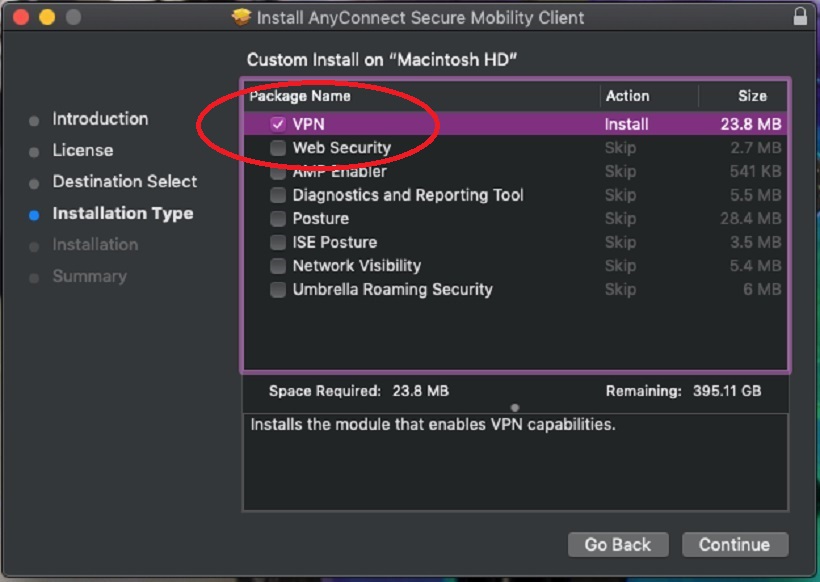
**Note: If you are using a Mac and are installing this software make sure that everything is this window is unchecked and that ONLY the VPN is checked marked. (shown below)